
AI Invoice & Estimate Maker
HorizonSoftBusiness
4.32.00 Reviews
- Version
- 9.2
- Installs
- 10.00K
- Age Rating
- Everyone
Screenshots
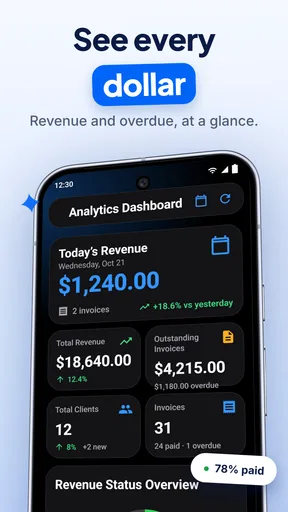
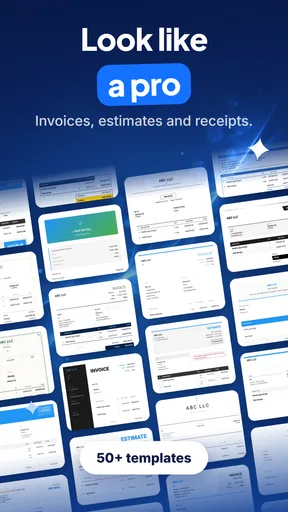
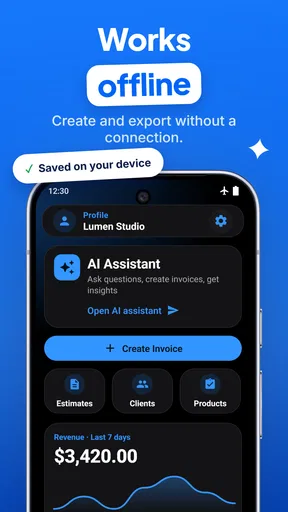
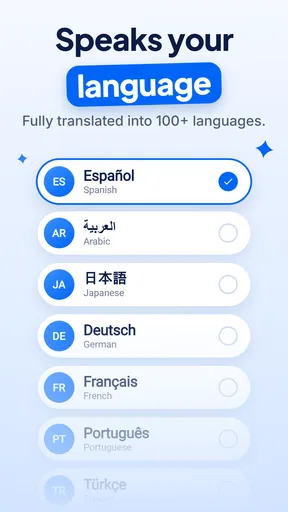
Our Review of AI Invoice & Estimate Maker
 Analysis by Appyee
I approach invoice tools with one simple question: can I use them calmly when a customer is waiting, a job has just finished, and I need a professional document without opening a complicated accounting system? AI Invoice & Estimate Maker, developed by HorizonSoft, is aimed at that exact moment. It is a business app for creating invoices and estimates, and its free entry point makes it easy to try before deciding whether it belongs in a regular workflow.
After spending time with it, I see the main appeal clearly. This is not trying to be a full replacement for every accounting task. It is more focused: help a small business owner, freelancer, contractor, or independent service provider turn work details into a presentable estimate or invoice. That focus can be useful, especially for people who find traditional business software visually crowded or unnecessarily formal.
The app has a 4.3 average from around 233 ratings and has passed 10K installs, so it is not an unknown experiment with no user activity. It is free to install, rated for Everyone, and currently listed as version 9.2. The free starting point is helpful, although optional purchases range from $2.99 to $139.99 per item, so I would check the purchase screen carefully before building a long-term process around paid features.
How the app feels to read and navigate
The strongest part of a focused invoice maker is usually the reduced mental load, and that is where this app makes the best first impression. Instead of asking me to learn a large accounting vocabulary, it keeps attention on familiar business actions: prepare an estimate, record what was supplied, and produce an invoice. That narrower purpose matters for anyone who gets lost in software with too many dashboards, reports, and settings.
For readability, the most important test is not whether the screen looks attractive. It is whether I can tell what to do next without rereading every label. An invoice workflow naturally has a sequence: identify the customer, describe the work, enter quantities or charges, review the total, and finish the document. An app built around that sequence is more approachable than a general ledger application, particularly for a person who only invoices occasionally.
I would still recommend moving slowly on the first document. Business forms punish small mistakes, and a clean interface does not remove the need to check names, descriptions, totals, and payment details. My practical habit would be to create one sample estimate before using the app with a real customer. That gives me a chance to understand where information is entered and how the finished document reads without the pressure of a live job.
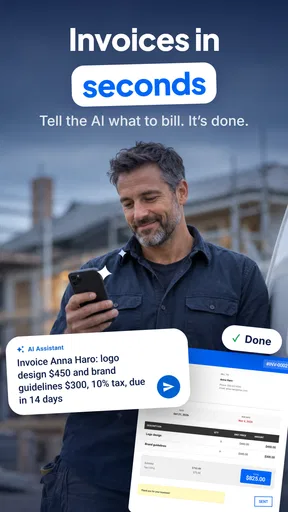
The AI element is potentially useful when I am starting with rough notes rather than polished wording. A tradesperson might know what was done but not want to spend time turning “replace damaged fitting and test system” into a neat line item. A freelancer may have a short project description that needs to become a clearer estimate. In those situations, assistance with wording can save time, but I would treat generated text as a draft. The customer should receive language that reflects the actual work, not wording accepted merely because it sounds professional.
That distinction is especially important for estimates. An estimate is not just an invoice with a different heading; it sets expectations. I would review whether the description explains what is included, whether exclusions are clear, and whether the wording could be misunderstood. The app can help me prepare the document, but it cannot know the practical boundaries of a job unless I provide them.
Useful habits for clearer documents
I found that the best results come from preparing the information before opening the form. I would keep the customer’s exact name, service date, agreed scope, tax details if relevant, and payment terms in front of me. This reduces the amount of switching between messages, notes, and the invoice screen, which is valuable for anyone who finds multitasking tiring or confusing.
Another useful habit is to separate the work description from the price in my notes. First I decide what the customer is paying for; then I decide how to display the amount. That makes it easier to spot an estimate that looks complete but does not explain the service. It also avoids relying on AI wording to fill gaps in the actual business decision.
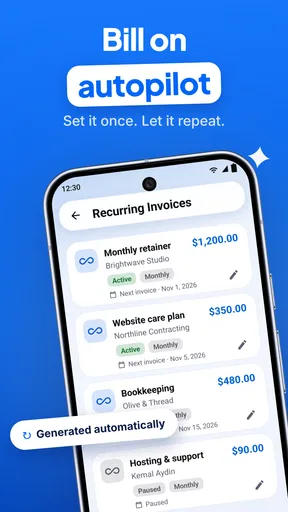
For recurring work, I would keep a small personal checklist rather than assuming the app will remember every preference. The checklist might include customer details, line-item descriptions, taxes, due information, and a final visual review. This is not glamorous, but it makes the app more dependable for people who use it between other tasks rather than sitting at a desk all day.
Access in different abilities and everyday situations
I find that everyday access is less about a feature checklist and more about whether I can complete a document comfortably in the places where work actually happens. I would test the workflow with the device settings and pace I rely on, then consider how much attention invoice creation takes on a busy day. That practical check helps clarify whether the app can become a steady habit rather than an occasional convenience.
Readability for different visual and cognitive needs
A simple invoice workflow can support people who struggle with dense business software, but simplicity is not the same as full accessibility. I would judge this app screen by screen: are labels understandable, are fields distinguishable from headings, and can I review a finished document without losing track of the important values? Those questions matter more to me than decorative design.
People with dyslexia, attention difficulties, or limited experience with financial apps may benefit from the direct purpose of the product. The task is concrete, and the vocabulary is closer to everyday work than the language used by enterprise accounting platforms. I would still avoid rushing through long forms. Breaking the process into short checks—customer, service, amount, final review—makes errors less likely and gives the user a reliable rhythm.
For someone with low vision, the practical experience will depend on how well the device’s own display settings work with the app. I would test larger text and increased display size before committing to it. If enlarged text causes labels or buttons to crowd each other, that becomes a real barrier even when the underlying workflow is straightforward. I would also review the final invoice at a comfortable zoom level before sending it, because a document that is difficult to read reflects poorly on the business.
Users with color-vision differences should not have to depend on color alone to understand whether a field is complete or whether a document is an estimate or an invoice. My advice is to look for written labels and clear wording throughout the process. If a status is communicated mainly through color, I would consider that a warning sign and use a different workflow for important customer-facing documents.
Motor, sensory, and fatigue-related considerations
Invoice creation often happens in less-than-ideal conditions: standing at a job site, holding a phone in one hand, working in bright sunlight, or trying to finish a task while tired. A focused mobile app is better suited to those moments than desktop accounting software, but mobile convenience can also create pressure to tap quickly. I would not prepare a customer-facing invoice while walking, driving, or handling tools. The app may be portable, but the work still deserves a stable moment of attention.
For users with limited dexterity or tremors, repeated small taps and precise text entry can be more difficult than the business task itself. I would use the device’s built-in dictation or keyboard assistance where available, then carefully verify the result. Dictation can speed up a service description, but names, quantities, and monetary values need deliberate checking because an incorrect word or digit can change the meaning of the document.
People who experience sensory overload may appreciate an app that stays within the invoice-and-estimate task instead of surrounding it with unrelated business modules. I found that the clearest approach is to prepare one document at a time and avoid leaving several unfinished drafts open mentally. If notifications, bright surroundings, or time pressure are already making concentration difficult, I would write the key details in a quiet place first and use the app only for final entry.
For users with motor limitations, the most important trade-off is speed versus verification. A fast workflow is valuable, but an invoice is not a good place to optimize every second. I would pause after entering the total and again before finalizing the document. Those two pauses are simple safeguards that make the app more usable for anyone whose hands, vision, or concentration vary during the day.
Situational access for small businesses
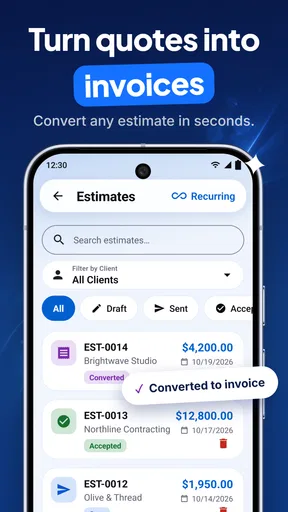
One realistic scenario is a self-employed cleaner finishing a move-out service. The customer asks for an estimate for an additional room, and the cleaner needs to describe the extra work before leaving. With this app, I would create the estimate while the details are fresh, review the wording, and then use the same information as the basis for the eventual invoice if the customer approves. The benefit is not just speed; it is keeping the agreed scope visible instead of relying on memory or scattered messages.
A second scenario is a freelance designer who works from a phone between meetings. The designer may have a project name, a short list of deliverables, and a total in a notes app. An invoice maker can turn that information into a more consistent document than an improvised message. I would still keep the project agreement separately, because an invoice should support the agreement rather than replace it.
A small repair business could use estimates to make conversations more precise. Instead of saying “it should cost about this much,” the owner can describe the planned work and amount in a document that the customer can review. The limitation is that an estimate does not automatically solve changes in scope. If the customer adds work, I would create a revised document or clearly update the description rather than quietly changing the amount.
The app is also suitable for someone who invoices only a few clients each month and does not want to learn a large subscription-based accounting suite. The free installation lowers the risk of trying it. However, the presence of in-app purchases means I would identify which part of my workflow depends on paid access before recommending it as the only business tool. A free download is convenient; a dependable long-term process needs predictable costs.
Where it may not be enough
I would not choose this as my only financial system if I needed deep bookkeeping, inventory management, payroll, bank reconciliation, or complex tax reporting. Its strength is document preparation, not the entire administrative life of a company. A dedicated accounting platform is the better choice when invoices must connect tightly to expenses, accounts, reports, and compliance records.
I would also hesitate if my business needs a highly specialized invoice format. Construction, consulting, healthcare, and international trade can each require fields and language that a general invoice maker may not handle exactly as needed. The right test is to build one real-world document and compare it with the requirements of the customer, accountant, or local authority before switching over completely.
Another barrier is trust in automation. AI can make wording easier, but it can also encourage users to accept a polished description that is too vague. I would never let generated language decide whether a service is taxable, whether a fee is included, or whether a promise has been made to the customer. Those are business judgments, and the owner remains responsible for them.
There is also a human-factor issue: a document can look professional while still being incomplete. If the app helps me create a neat invoice but I forget payment instructions, a due arrangement, or a clear service description, the visual result does not solve the operational problem. My recommendation is to use a repeatable review checklist and keep the app as one part of the process, not the process itself.
My inclusive verdict
AI Invoice & Estimate Maker is a sensible option for independent workers who want a focused way to prepare business documents on a mobile device. I like that it speaks to a practical need instead of forcing a small operator into a full accounting environment. The Everyone age rating and free starting point also make it approachable for a broad range of users, including people who are testing their first formal invoicing workflow.
Its accessibility value comes mainly from focus and reduced complexity. That can help users who find conventional business software overwhelming, who work away from a desk, or who need to complete a document in short sessions. I would pair it with device-level text, keyboard, and display settings, then test the complete workflow under the conditions in which I actually work. A tool that feels comfortable at a desk may behave differently in sunlight, with one hand, or during fatigue.
I would recommend it to freelancers, tradespeople, tutors, cleaners, consultants, and small service businesses that mainly need estimates and invoices. I would skip it in favor of a broader accounting solution if financial reporting, inventory, payroll, or detailed tax management is central to the business. I would also compare the purchase options carefully before depending on features that may sit behind paid access.
My final view is positive but practical: this is a useful document-making companion, not a substitute for sound business records. If I prepare accurate details, review AI-assisted wording, check every amount, and confirm that the finished document is readable, the app can remove a frustrating part of running a small business. The best reason to use it is its focused workflow; the best reason to be cautious is that professional-looking paperwork still needs human judgment.
HorizonSoft has positioned the app for people who want to move from informal notes and messages toward clearer estimates and invoices without taking on a large system immediately. For that audience, I can recommend giving it a careful trial. I would start with a sample document, test it with my own accessibility needs and real working conditions, and only then decide whether it deserves a permanent place in my business routine.
Verdict
Strengths of AI Invoice & Estimate Maker
- Creates professional invoices and estimates in minutes
- AI helps speed up item descriptions and document creation
- Useful templates give documents a polished appearance
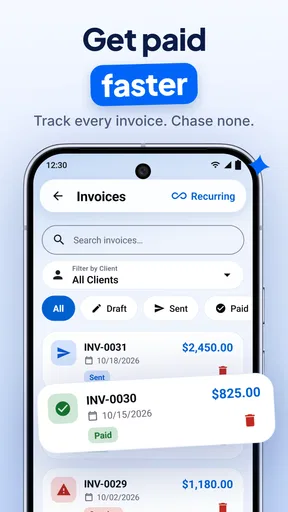
- Tracks invoice status to help organize outstanding payments
- Mobile access lets you work with clients from anywhere
Limitations of AI Invoice & Estimate Maker
- Advanced features may require a paid subscription
- AI-generated details should be checked for accuracy
- Customization options may be limited in the free version
- Payment and accounting integrations can vary by region
- Frequent invoicing may require time to organize client records
Similar Picks in This Category
View All
LinkedIn: Community & Network
LinkedIn3.8

Zoom Workplace
zoom.com4.1

Microsoft Teams
Microsoft Corporation4.6

Meta Business Suite
Meta Platforms, Inc.4.6

Webex Meetings
Cisco Systems, Inc.4.5

TeamViewer Remote Control
TeamViewer4.4
Frequently Asked Questions
What is AI Invoice & Estimate Maker used for?
AI Invoice & Estimate Maker is designed to help freelancers, contractors, small businesses, and service providers create professional invoices and estimates from a mobile device. After reviewing the app, its main appeal is the ability to organize customer details, describe services, calculate totals, and prepare documents without relying on complicated accounting software. It is particularly useful for users who need a quick billing solution while working away from the office.
How does the AI feature help create invoices and estimates?
The AI feature can simplify the writing process by helping turn a short description of a job or service into clearer invoice or estimate content. This may save time when preparing item descriptions, service details, or customer-facing notes. However, users should still review every amount, tax, discount, and description before sending a document, because AI-generated information can require corrections and should not replace careful financial checking.
Can I customize invoices and estimates with my business information?
Yes, the app is intended to let users personalize documents with important business details such as a company name, contact information, customer data, line items, prices, taxes, discounts, and payment terms. Depending on the available version and plan, customization options may also include branding or layout preferences. Before downloading, users should check which templates and personalization tools are included for free and which may require a subscription.
Can invoices and estimates be exported or sent to customers?
AI Invoice & Estimate Maker is built around creating documents that can be shared with customers, commonly through options such as PDF export, email, messaging apps, or other sharing tools supported by the device. The exact export and sharing features can vary between Android and iOS versions and may depend on the selected plan. It is recommended to test the sharing workflow and confirm that the final document displays correctly before sending it professionally.
Is AI Invoice & Estimate Maker suitable for accounting and tax management?
The app can be useful for preparing invoices, estimates, and basic billing records, but it should not automatically be treated as a complete accounting or tax-management platform. Users may still need separate tools for bookkeeping, expense tracking, inventory, payroll, tax reporting, payment reconciliation, and legal compliance. Before relying on it for business operations, verify whether it supports your currency, tax rules, invoice requirements, data backup needs, and local regulations.
